
Fundraising tools for nonprofits
Raise money right where you sell tickets, with campaign pages, one-time and monthly gifts, a record of gifts that come in other ways, and a donation ask at checkout.

Everything you need to raise money sits right next to your ticketing. Give each appeal its own campaign page with a goal, let donors give once or every month, record gifts that arrive by check or through another platform, and invite ticket buyers to add a gift at checkout. Your patrons' gifts show on their records, next to their ticket purchases.
Campaigns
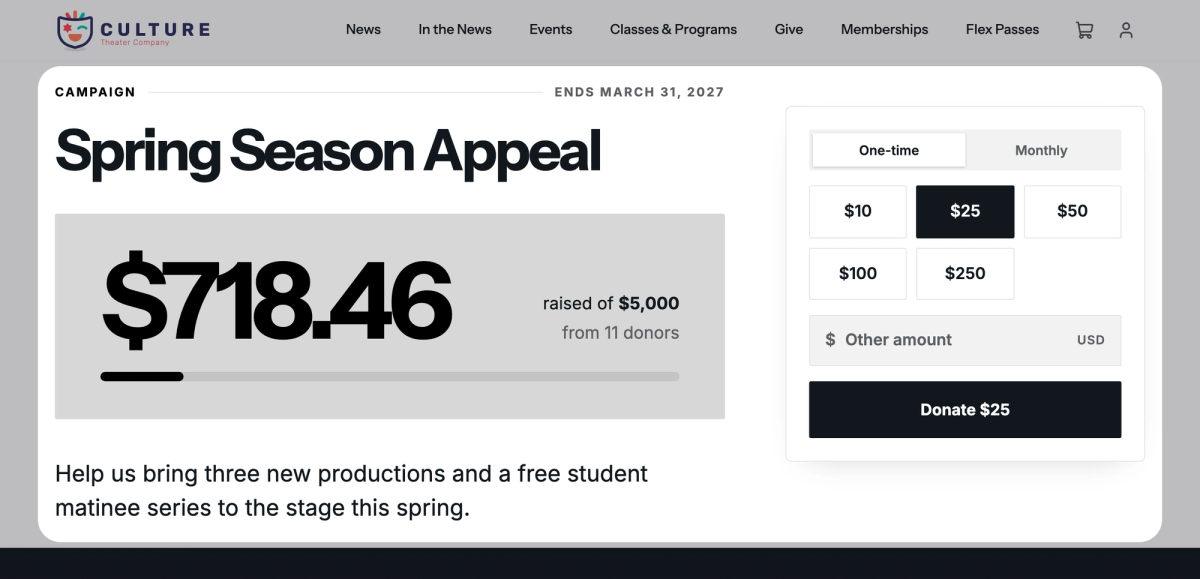
A campaign is a page on your website for one appeal, like a gala or a new roof. Set a goal and turn on Show goal progress, and donors see a progress bar fill as gifts come in. You choose the suggested amounts, and see what each campaign has raised and who gave. Share the page's link or QR code, or add a donation form to another website.
Your first campaign becomes your default campaign, which receives gifts added at checkout. A general one like your annual fund makes the best default, and you can switch with Make Default.
You'll need the Manage fundraising campaigns permission to create and edit campaigns. Run a fundraising campaign walks you through setting one up.
One-time and monthly gifts
On every campaign page, donors choose One-time or Monthly, pick an amount or type their own, and pay by card.
Monthly gifts are charged automatically each month, on the day the gift started. Donors can pause, change the amount, update their card or cancel from the link in their emails or their profile's Donations page. You can also start a monthly gift for a donor over the phone, with their card.
If your organization is tax-exempt, add your EIN and Legal organization name under Tax-exempt status in Settings › Organization before you take gifts. They're printed on your donors' year-end tax receipts.
To start, cancel or refund a gift, you'll need the Manage donations permission; View donations lets you see the Donations and Monthly Gifts lists under Fundraising. One-time and monthly gifts has the details.
Covering the service fee
You choose, campaign by campaign, whether donors can cover Stageworks' service fee. Turn on Allow patrons to cover the platform fee (that's the service fee) in a campaign's Settings, and donors can check a box to pay it on top of their gift; otherwise it comes out of the gift.
For a tax-exempt organization, a $50 gift leaves you $47.75 after the $2.25 fee. A donor who covers it pays $52.34, since the fee is figured on the larger total, and you get the full $50. For the rates, see How service fees work.
Gifts from anywhere else
Record a check or cash gift by hand, or import a CSV file of gifts from another platform or your old donor software. Gifts you record or import carry no service fee, and importing doesn't email your donors. Imported gifts are matched to patrons by email, and you can link any without a match afterwards.
You'll need the Manage donations permission. Record and import donations shows how.
Donations at checkout
Turn on Ask for a donation at checkout in Settings › Organization, and ticket buyers can add a gift on their way through. The gifts go to your default campaign, so the ask only shows while patrons can give to it. Patrons can't cover the service fee at checkout, so it comes out of the gift.
You'll need the Manage organization settings permission to turn it on. Ask for donations at checkout has the rest.
Thank-you emails
Donors who give on a campaign page or at checkout get a thank-you email. Monthly donors get a welcome email with a link to manage their gift, then a thank-you for each later payment, and an email if a payment doesn't go through. Each campaign sends your organization's default emails until you customize them on its Automated Emails tab.
 SuggestedQuickBooks Online and StageworksUsing QuickBooks? Stageworks can send the gifts donors make online there, to the account you choose.
Was this article helpful?
Run a fundraising campaign
Give an appeal its own page on your site, with a goal donors can see, and see every gift to it in one place.
One-time and monthly gifts
Let donors give once or every month from your website, then see, start, cancel and refund gifts in Stageworks.
Record and import donations
Add gifts that came by check, cash or another platform to Stageworks, one at a time or from a spreadsheet, and link them to your patrons.
Ask for donations at checkout
Invite every ticket buyer to add a gift to your default campaign on their way through checkout.