
How service fees work
What the Stageworks service fee is, your choices for who pays it and what patrons see, and where it shows up in your orders and reports.

Stageworks is free to use. Tickets sold by card carry a service fee (cash and other payments carry none), and you choose how it's paid.
On online sales, you can pass the fee on to patrons (the default), absorb it, or split it. If patrons pay any of it, show it as a Separate fee or build it into the price with Include in price.
What the service fee is
The service fee is a percentage of the ticket price, and of any fees you add, plus a flat amount per ticket. Stageworks sets your rates: one for most tickets (Base) and one for Reserved seating. To see them, go to Settings → Payments and click the Fees tab. You'll need the Manage payment settings permission to open it.
Say your Base rate is 4.5% + $0.75. On a $35 ticket, the service fee is $2.33, so the patron pays $37.33.
What patrons see
With Separate fee, the default, patrons see "$35.00 + $2.33 fee" when they choose tickets, and a Service fees line in their cart and at checkout. With Include in price, they see one price, $37.33, that includes the fee. Either way, they pay the same total.
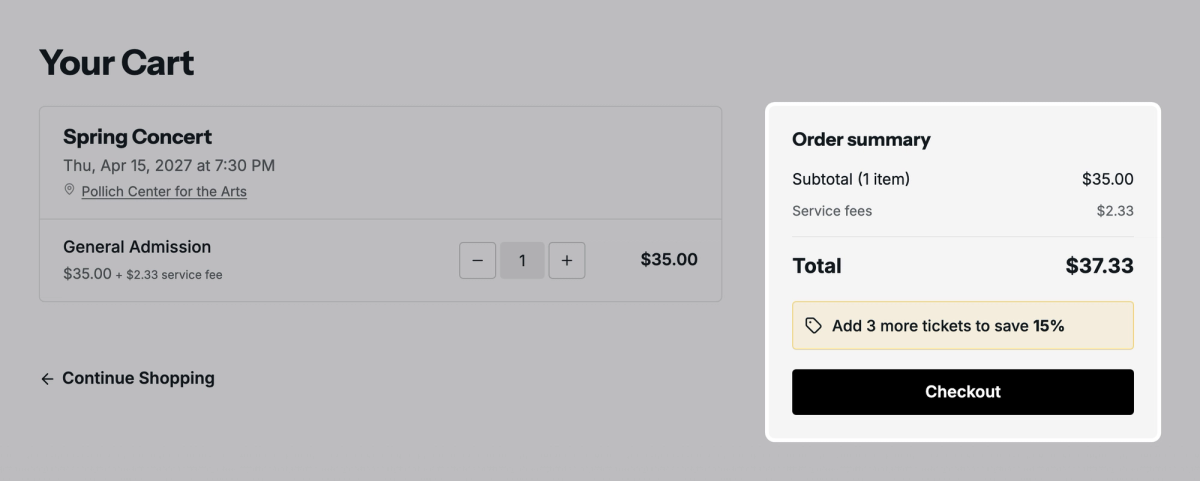
With Separate fee, your own fees, like a facility fee, are in the "+ $X fee" figure when patrons choose tickets, then listed by name in the cart, at checkout, and on the receipt. With Include in price, they're in the one price.
Box office, discounts, and comps
With Separate fee, sales your staff make (at the box office, or in the Stageworks app) don't add a service fee on top of the price; on card sales, your organization pays the fee instead. With Include in price, the service fee is part of the ticket price at the box office too.
A discount lowers the service fee, which is based on what the patron pays. With 20% off that $35 ticket, the patron pays $28 and the fee is $2.01. Comps carry no service fee, and neither do tickets a flex pass covers in full.
Refunds
When you refund a ticket paid by card, the patron gets back the price and the service fee they paid. Stageworks keeps its fee, so your organization is out $2.33 on that $35 ticket.
Where fees show for you
On an order's page (Ticketing → Orders), the Payment section lists Service fees: the service fees the patron paid on that order. Orders where the patron paid none, like a box office sale with Separate fee, don't have that line.
In the Ticket Sales and Financial Summary reports, under Reporting, Service Fees is only what your organization paid, taken off your sales, so it differs from the Service fees on your order pages. You'll need the View reports permission to see these reports.
 SuggestedQuickBooks Online and StageworksUsing QuickBooks? Stageworks can send your sales and fees there, each to the account you choose.
Where to go next
Choose who pays service fees: split the fee between patrons and your organization, and choose how patrons see it.
Add your own fees: charge a fee of your own on tickets, like a facility fee.
Was this article helpful?