How flex pass redemption works
How patrons use their flex tickets online, how you apply them at the box office, and how to keep track of what's left.
When a patron uses flex tickets, each one pays for one event ticket. Online, checkout applies them for the patron automatically. At the box office, you apply them to the order yourself. If you're new to flex passes, start with Flex passes explained.
How flex tickets get applied
The patron, or you at the box office, chooses how many flex tickets to use on any event their pass covers, until the pass expires. Stageworks handles the rest:
- For each performance, it covers the cheapest tickets first.
- If the patron has more than one pass that works for the event, Stageworks picks which one to use.
- Free tickets never use up a flex ticket.
- A pass can limit how many flex tickets a patron uses on each performance (Max uses per event) or across a show's whole run (Max uses per series). Past that limit, the rest of the order is paid as usual.
Paying the difference
A pass can have a max ticket value: the most one flex ticket covers. When a ticket costs more, the patron pays the difference.
Say the max ticket value is $30 and a patron uses two flex tickets on two $36 tickets. Each flex ticket covers $30, so the patron pays $12 ($6 per ticket), plus any fees on that $12. If the pass has no max ticket value, or the ticket costs $30 or less, the flex ticket covers the whole ticket.
You set the max ticket value and the limits on the pass itself; see Set up and sell flex passes.
When patrons check out online
Patrons sign in, add tickets for an eligible event to their cart, and checkout applies as many of their flex tickets as it can. The order summary shows a Flex tickets row with how many are available, which pass they're from, and how much comes off the total.
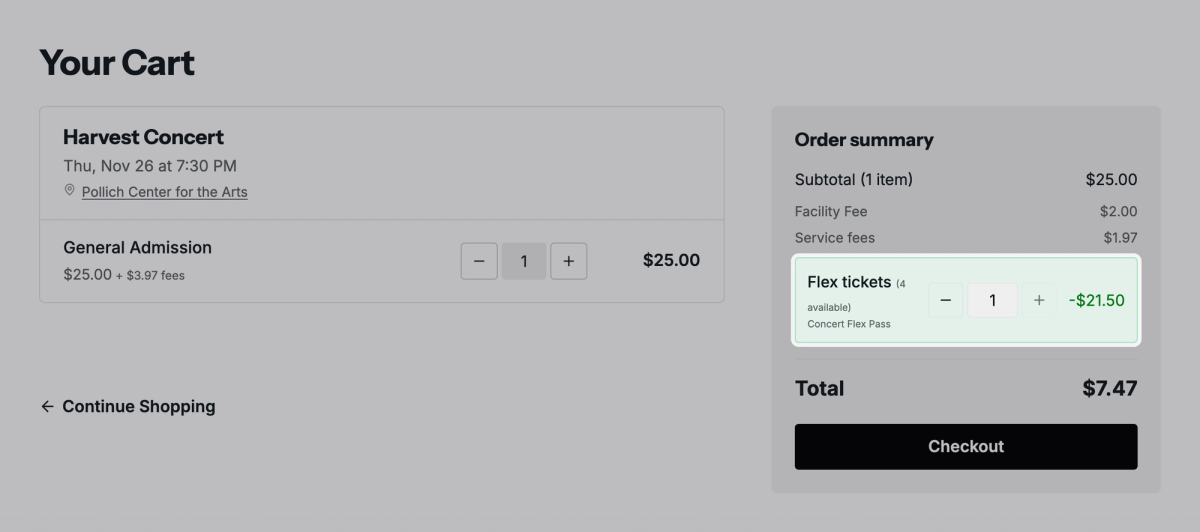
To save some for another show, the patron can click the minus button on that row to use fewer. If the pass limits how many apply to the event, the row says so, for example "Up to 2 of your 6 flex tickets apply to this event."
All Access has no ticket count, so for its holders the row reads (All Access pass) instead. Checkout works the same in the widgets you embed on your own website.
Redeem flex tickets for a patron
At the box office, flex tickets aren't applied until you add them.
- Step 1:
Click Ticketing, then Box Office, and open the performance.
- Step 2:
Click Sell tickets. The ticket picker opens for that performance.
- Step 3:
Add the tickets the patron wants, then click Add to order.
- Step 4:
In Search by phone, email, or name, find the patron and choose them.
- Step 5:
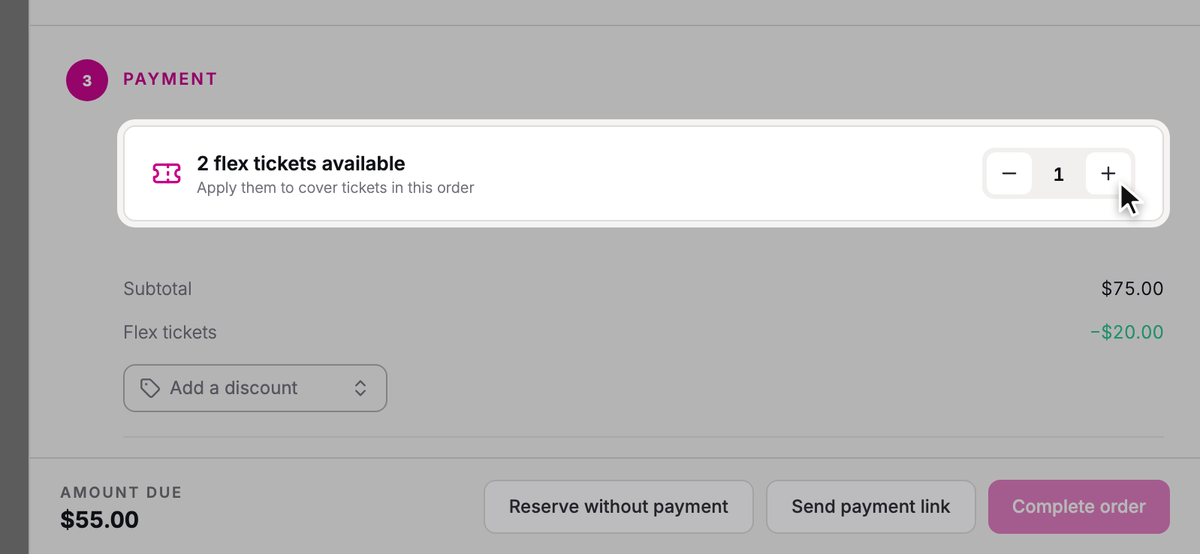
Beside the patron's balance, like 4 flex tickets available, click the plus button once for each ticket you want to cover. The Amount due drops with each one, and the plus button stops at the pass's per-event limit.
- Step 6:
Choose how the patron pays what's left, like Cash or Card, then click Complete order.
At the door
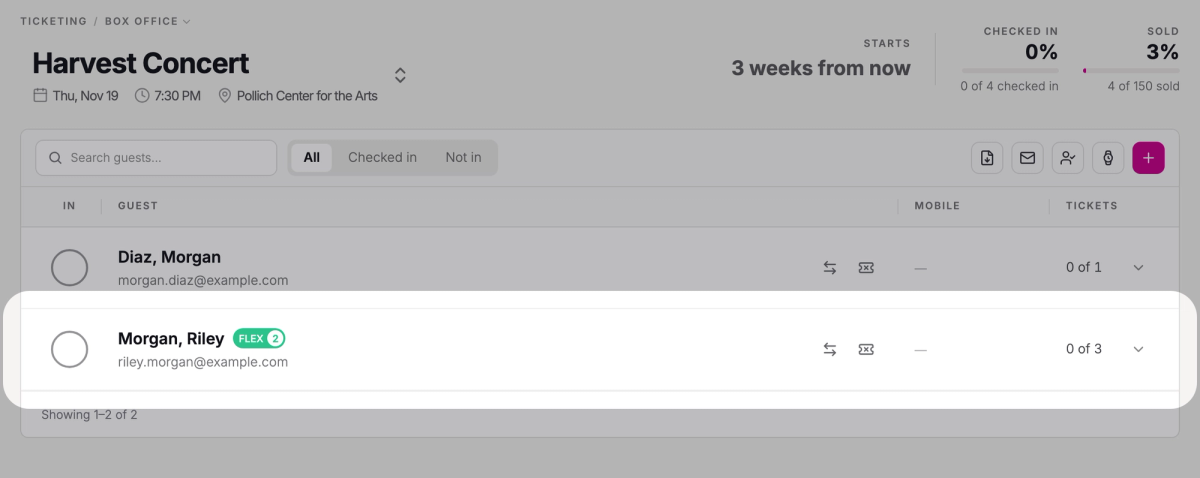
In the performance's guest list, a FLEX label marks patrons whose tickets were paid with flex tickets, with a number beside it when they used more than one. Checking them in doesn't use any more flex tickets; they were used when the order was placed.
If a ticket is canceled or refunded
When you cancel a ticket that a flex ticket paid for, with or without a refund, the flex ticket goes back to the patron's balance. The same happens when you exchange the ticket, or cancel a date and refund its tickets.
Keep track of balances
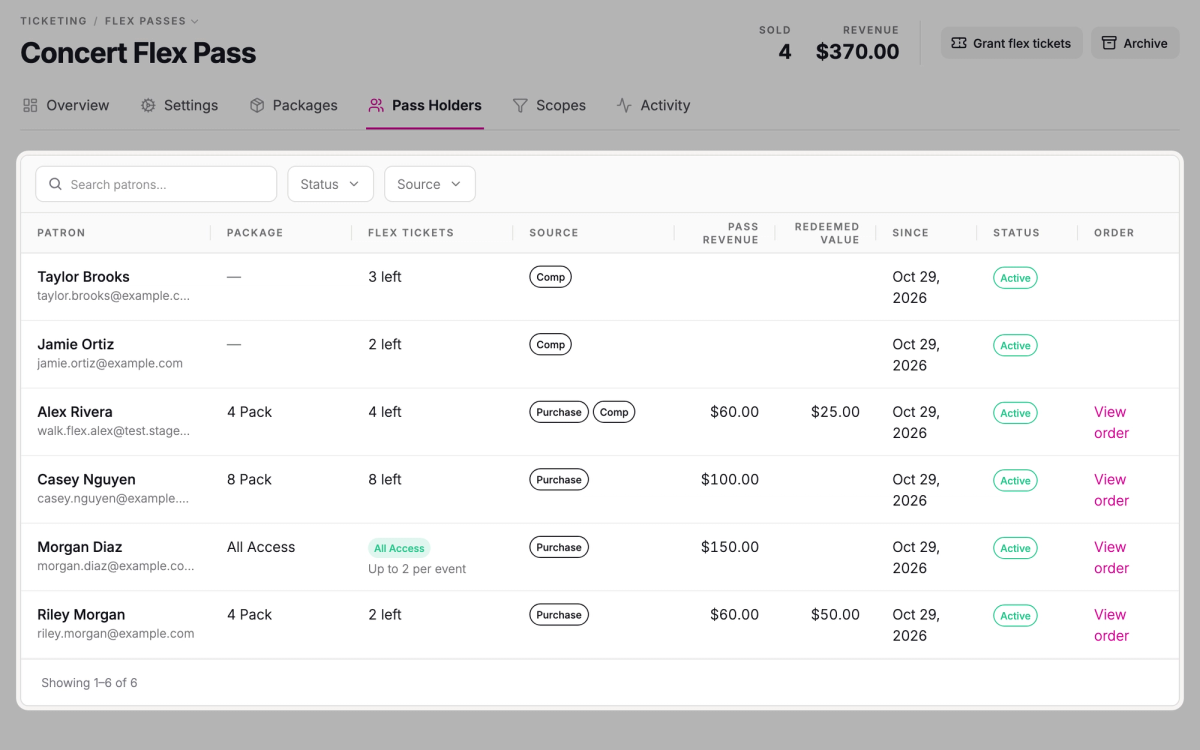
Click Ticketing, then Flex Passes, and open the pass. Two tabs show how it's being used:
- Pass Holders lists everyone who holds or has held the pass, with how many flex tickets they have left and, under Source, how they got them. Redeemed Value is the full price of the tickets they've used, even when a flex ticket covered only part of it.
- Activity shows totals, including Tickets redeemed and Tickets gifted, and every gift sent on the pass with its status.
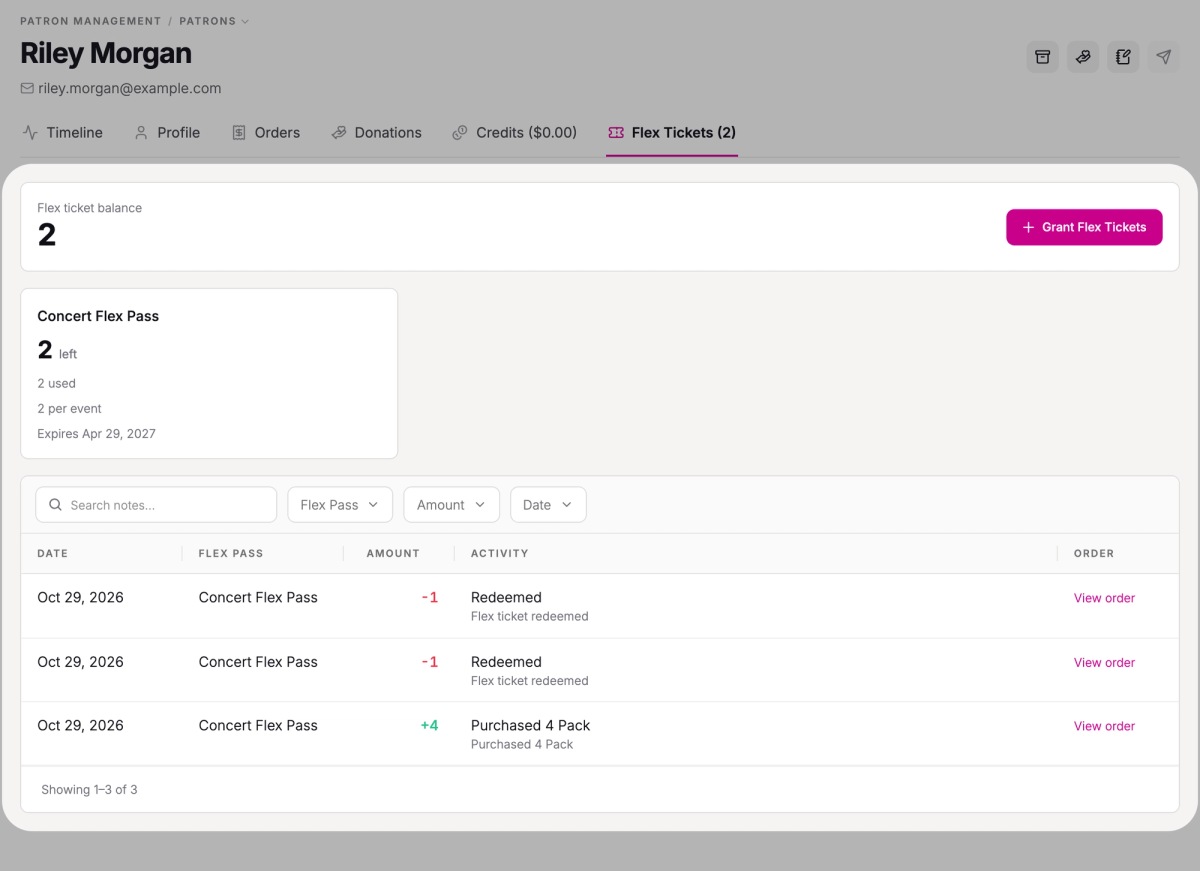
For one patron, open them under Patrons and click the Flex Tickets tab. You'll see their Flex ticket balance, a card for each pass with how many are left and used, its limits and when it expires, and a history of every purchase, redemption, and gift.
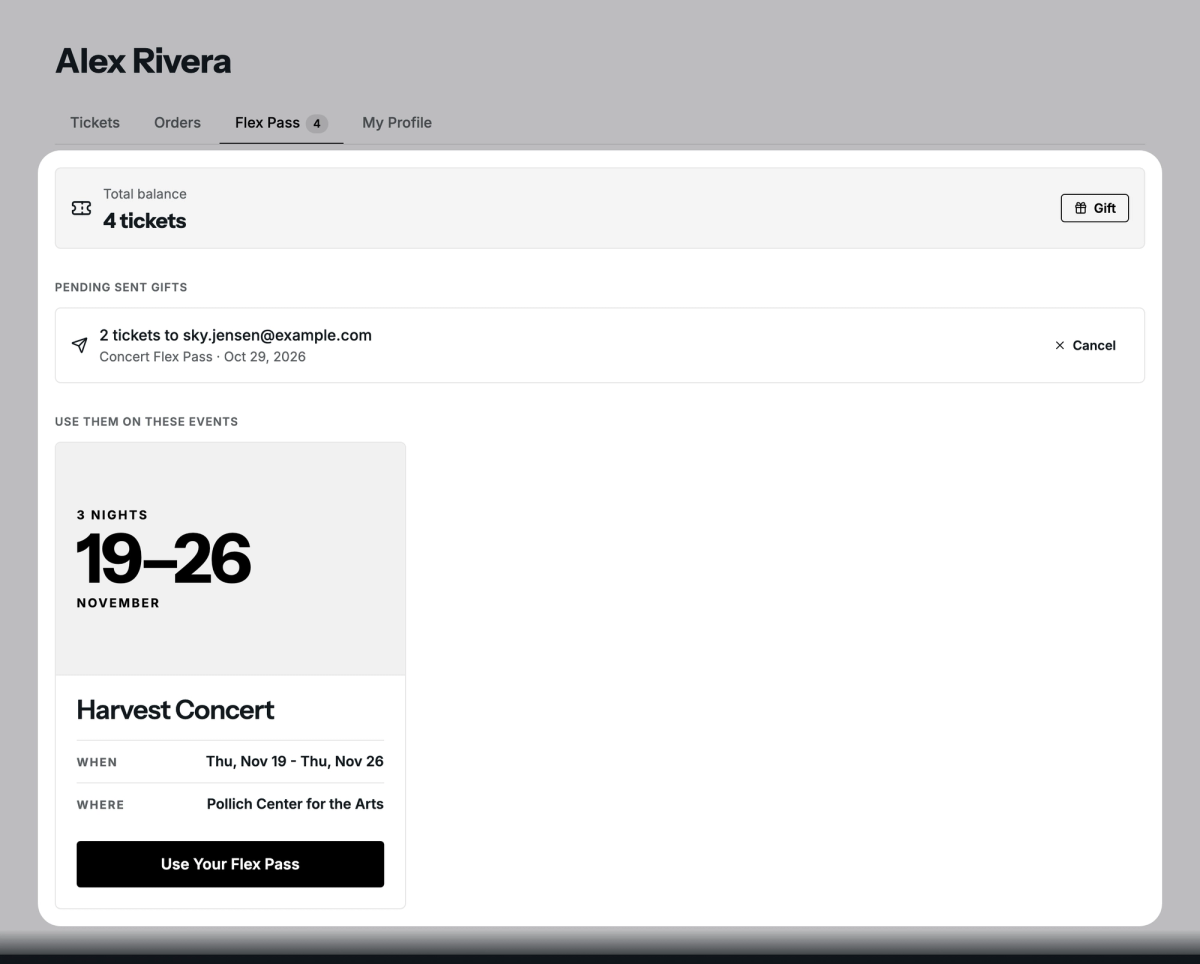
On your website, patrons find their flex tickets under Flex Pass in their profile. It shows their Total balance, a Gift button if their pass allows gifting, their gifts, and the events they can use the tickets on. It doesn't show their history or when their tickets expire; for those, use the patron's Flex Tickets tab, which only your team sees.
Reminder emails
Two automated emails nudge patrons to use their flex tickets:
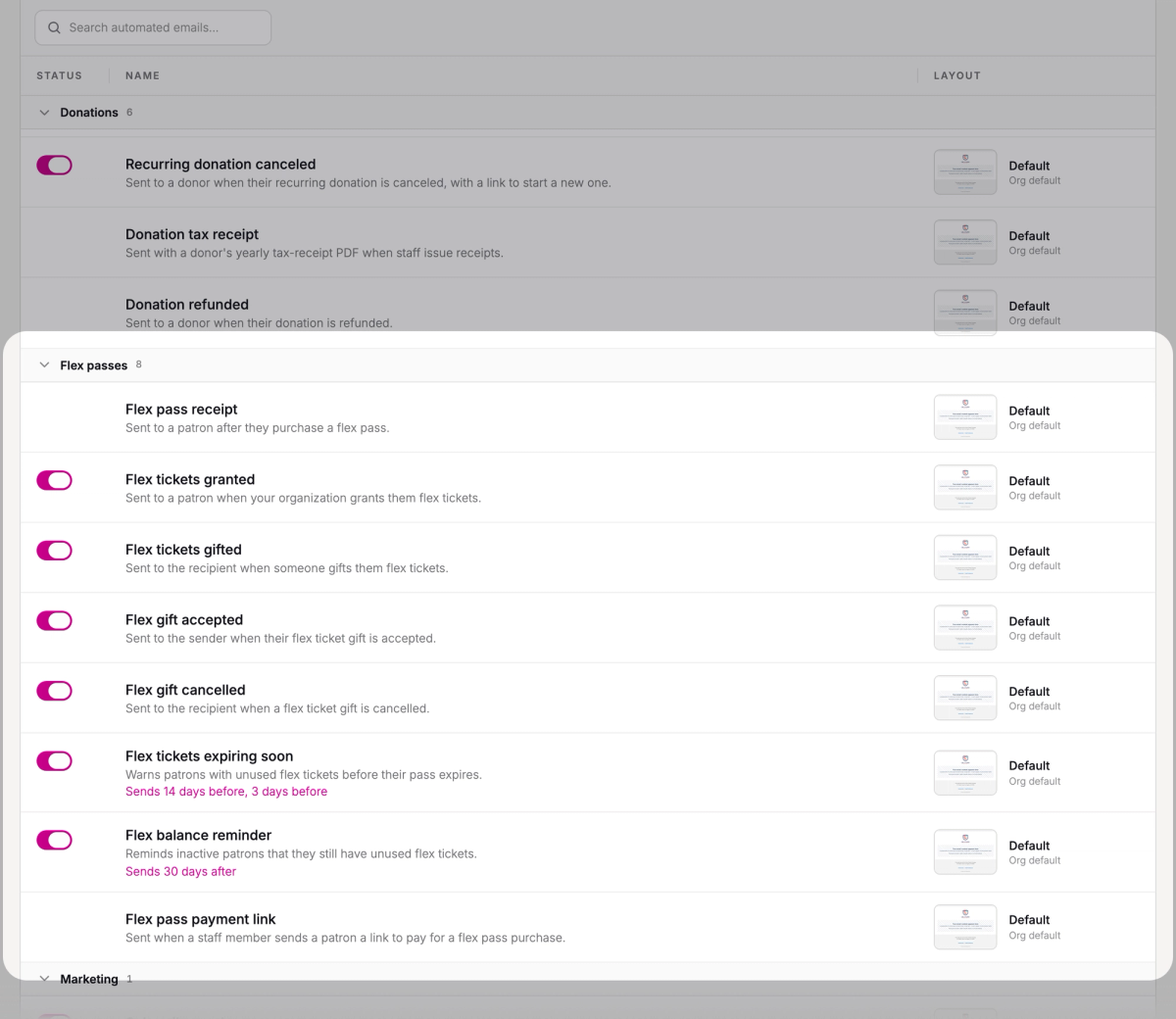
- Flex tickets expiring soon warns patrons with unused flex tickets before their pass expires, by default 14 days and 3 days before.
- Flex balance reminder reminds patrons who still have flex tickets but haven't used them in a while: by default after 30 days, and at most once a month.
Both are on unless you turn them off. To change when they send, go to Settings → Email → Automated Emails and find them in the Flex passes group.
Gifting flex tickets
Patrons can give some of their flex tickets to someone else when Allow patrons to gift tickets is on in the pass's Settings tab. All Access can't be gifted.
From Flex Pass in their profile, the patron clicks Gift, enters the person's email or phone number and how many tickets, and clicks Send gift. The tickets leave their balance right away, and the recipient gets an email or text with a link.
The recipient clicks Accept this gift, signs in or creates an account, and the tickets are added to their balance. Until then, the sender can cancel the gift under Pending sent gifts and get the tickets back.
Was this article helpful?