
Box office: check in guests and sell tickets at the door
How the Stageworks box office works on the web and in the app, who can work your door, and which card reader suits your venue.

The box office is where you work the door on show day. You check guests in as they arrive, and sell tickets to anyone who walks up without one. Here's how the pieces fit together.
Where you work the door
You can run the box office from two places, and they share the same guest list.
On the web, click Ticketing, then Box Office in the sidebar. It's a good fit for a laptop or desktop at a box office window.
Or use the Stageworks app on an iPad, iPhone, or Android device. Get it from the App Store or Google Play. Many organizations work the door from an iPad, and the app can also scan the QR code on each patron's ticket.
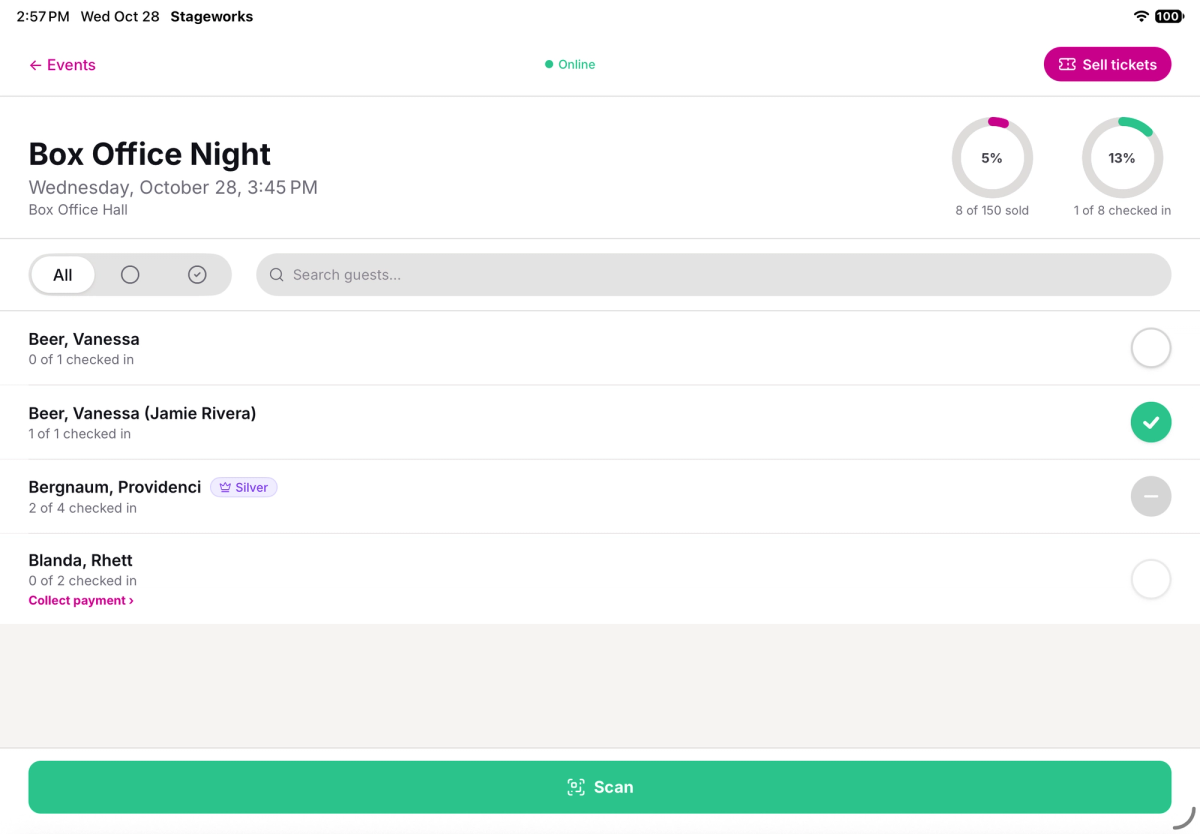
Check-ins show up on every device as they happen, so several people can work the same door at once. You'll need an internet connection at the door to check guests in.
Who works the door
Team members sign in to the app with their Stageworks login, the same one they use on the web. Checking guests in needs the Check in guests permission; selling tickets and taking payments need Manage orders. You set permissions for each role under Settings → Team.
Volunteers and temporary staff don't need a login. Give each of them a 6-digit access code from the web box office. They type it into the app, and it opens that one event, where they can check guests in and scan tickets, but not sell tickets or take payments. See Give temporary staff an access code.
Card readers at a glance
Stageworks takes card payments through Stripe. To take cards in the app, you'll need a Stripe card reader. On the web, you can also type in a patron's card. Cash and checks need nothing extra.
Wi-Fi readers, like the Stripe Reader S700, stay on a counter and have their own screen. They work in both the web box office and the app, and any of your computers or iPads can use one. Choose Wi-Fi for a fixed box office window, or if you sell from a computer.
Bluetooth readers, like the Stripe Reader M2, are small and easy to carry. They work only in the app, connected to one iPad or phone. Choose Bluetooth if you want to sell while you walk a line or work a lobby.
You can buy readers directly from Stripe: the Stripe Reader S700 and the Stripe Reader M2.
Where to go next
If you haven't set up a show yet, start with Create your first event. Then:
- Check in guests on the web: find guests, check in a whole party or part of it, collect from guests who still owe, and print the guest list.
- Check in guests with the Stageworks app: sign in, check guests in by name, and scan tickets.
- Give temporary staff an access code: create, send, and revoke codes for volunteers and door staff.
- Sell tickets at the door: sell to walk-up patrons on the web or in the app, and take payment by card, cash, or check.
- Set up a Wi-Fi card reader: register the reader once, then choose it on each computer and iPad you sell from.
- Connect a Bluetooth card reader: connect a reader to the app on your iPad or phone.
Was this article helpful?
Check in guests on the web
Check guests in from the box office on your computer, collect from guests who still owe, and print a backup guest list.
Check in guests with the Stageworks app
Check guests in at the door from an iPad, iPhone, or Android device, by name or by scanning their ticket.
Give temporary staff an access code
Let volunteers and door staff check in guests for one event in the Stageworks app, with a 6-digit code instead of a Stageworks login.
Sell tickets at the door
Sell tickets to walk-up patrons from the web box office or the Stageworks app, and take payment by card reader, cash, or check.
Set up a Wi-Fi card reader
Register a Stripe Wi-Fi card reader to your venue, then use it to take card payments at the door, on the web and in the Stageworks app.
Connect a Bluetooth card reader
Connect a Stripe Reader M2 to the Stageworks app on your iPad or phone, then take card payments with it at the door.